
Leveraging the state method
Understanding how to use the state method and customise it to your project's needs
Part of the Mastering dbt series. Access to the full Study Guide. Let’s connect on LinkedIn!
Notes from the state method documentation.
As dbt projects scale, running the entire DAG for every change quickly becomes inefficient—both in time and compute cost. To solve this, dbt offers state-based selection, which enables you to compare your current project against a previous state and run only the resources that have changed.
In order to attain this, it uses the manifest.json file and the --state method. Learn exactly how this works and how to customise state-based selection to your needs.
The manifest file
After executing a dbt command, a manifest.json file is created in the project’s target directory. Even if you’re only running specific nodes of the project, this file will contain a full description of your project’s resources and configurations.
The manifest file is used for analysing the project’s health, compiling the docs site, and allowing state comparison.
It’s important to remember that with every parsing, dbt overwrites the manifest file in the target directory. Therefore, you should never compare a project’s state to the target manifest, as it leads to incorrect or unreliable results (e.g., no changes detected or warnings about a missing manifest).
Instead, you can store artifacts from a previous run in a separate folder and use that path for state comparison.
State comparison
The state method enables you to select nodes according to a comparison with previous versions of the project.
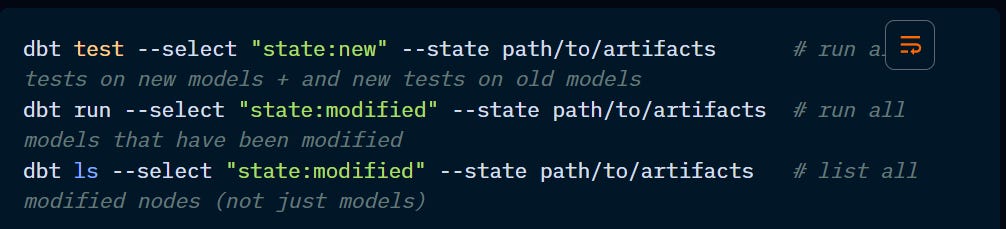
The commands above are using state:new and state:modified, and dbt offers another two states.
state:new will only select new nodes, that is, nodes whose unique_id are not already included in the comparison manifest. Bear in mind that a test is a resource, so new tests in existing models will also be selected.
state:old is the opposite of new, that is, it will select nodes that already exist in the manifest.
state:modified selects existing models that have been modified.
state: unmodified is the opposite of modified and runs all nodes that had no changes.
Deep-dive into state:modified
Due to the complexity and diversity of dbt projects, there are aspects to consider when using state:modified to ensure it meets your specific needs.
Additional subselectors:
You can specify which aspect of the node needs to be compared against the manifest using the following subselectors:
state:modified.body → changes to the node’s body like in a SQL model or seed values.
state:modified.configs → selects resources whose configs have changed since the last manifest. These changes don’t include database, schema, and alias.
state:modified.relation → changes to database, schema, and alias.
state:modified.persisted_descriptions → changes to descriptions, but must have persist_docs enabled at each level.
state:modified.macros → changes to upstream macros called directly or indirectly.
state:modified.contract → resources whose contract has changed. In the case of breaking changes, an error will be thrown.
If no subselectors are used, dbt will enforce all of the above, plus other resource-specific criteria such as freshness, quoting, and maturity.
Impact of group changes:
While running on state:modified, dbt will track node-level config changes, including group definitions, access permissions, deprecation dates, and latest_version.
If a group definition changes, the models affected will be caught under the state:modified selection. However, as the group configuration can be used to control resource access, this may cause breakage downstream.
Even if you update the group everywhere, dbt still flags these nodes as modified, and any resulting access or reference issues are detected during parsing or execution.
Attention to partial parsing: with partial parsing enabled, dbt may not immediately detect downstream reference issues during parsing, but they will surface during execution (especially if downstream nodes are included in the run).
The “nothing to do” error and selecting downstream resources:
This error is thrown when dbt flags a node as modified, but nothing needs to be run (for instance, in the case of metadata-only changes).
The run will be successful, but things may still break downstream. That is why it is recommended to include downstream models using state:modified+.
Seed files behaviour:
State comparison differs for seed files according to their size:
Small seeds (< 1 Mib): included only when the contents change,
Large seeds (>= 1 Mib): included only when the seed file path changes.