
Part of the Mastering dbt series. Access to the full Study Guide. Let’s connect on LinkedIn!
Notes from the Data test configurations documentation.
Let’s cover the possibilities around configuring your tests and deep-dive into customisation options to handle large datasets and set default paths for stored failures.
Where to define data test configurations
Data tests can be configured in:
under the config: method nested inside properties - this is for generic tests only.
inside a config() block within the test’s SQL definition.
in the dbt_project.yml file.
The config inside the dbt_project.yml file is always the last precedence, however the hierarchy differs for singular and generic tests:
Generic tests: (1) takes precedence over (2)
Singular test: (2) takes precedence over (1)
Resource-specific configurations
The following configs are available specifically for data tests:
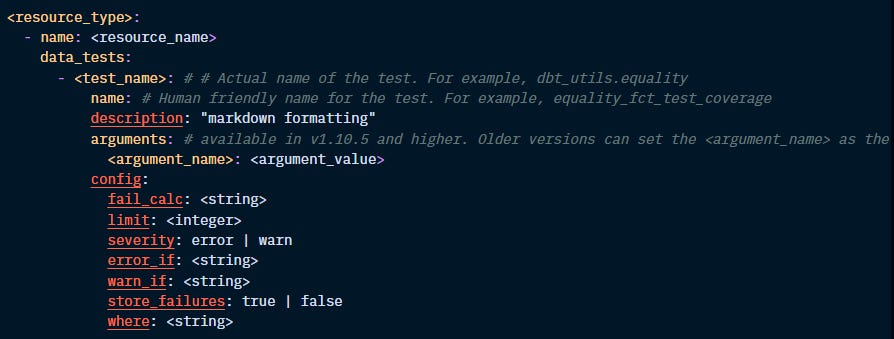
Let’s define each one of these configs:
fail_calc:
All tests return the set of records that fail the assertion. By default, dbt returns the count(*) of records.
This config allows you to change this calculation. For instance, for a test that checks for duplicate records, you can set fail_calc to "case when count(*) > 0 then sum(n_records) else 0 end".
If this calculation returns an error, like a data type error, the test won’t pass or fail, but it will return an error.
limit:
Limit the number of failures returned, specifically useful for large datasets and when failures are being stored in the database.
Example: “limit: 1000”
severity, error_if, warn_if:
By default, when even a single record fails the assertion, the tests will produce errors and prevent the model from running. This config allows you to add some leniency to your tests.
When you set up the severity: config to error, dbt will look for the error_if and warn_if configs, which will set up the conditions to bring an error or a warning:
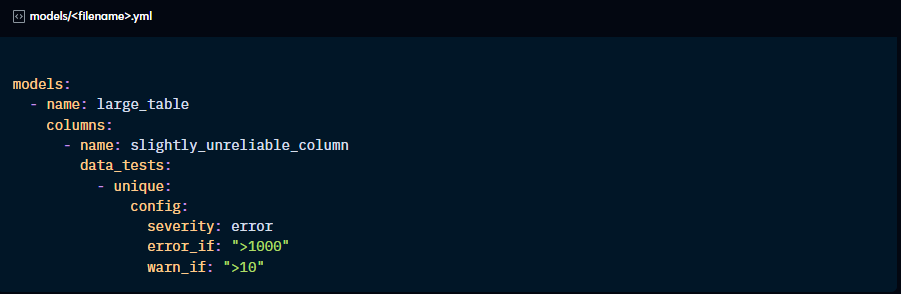
If severity: is set to warn, then dbt skips the error_if config and only considers warn_if. As with warnings of any nature, dbt will not fail the run, but you can promote warnings to errors using the --warn-error flag when running the models.
store_failures:
Optionally set a test to always or never store failures in the database. By default, the failed results will be stored in a schema named _dbt_test__audit, but this can be customised.

Ensure you have the correct permissions to create schemas in the database.
where:
Allows you to limit the records being tested. For instance, you can tell dbt to only test the assertion on records for which column A is not null.
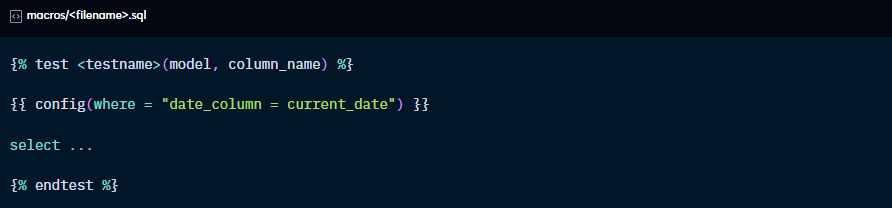
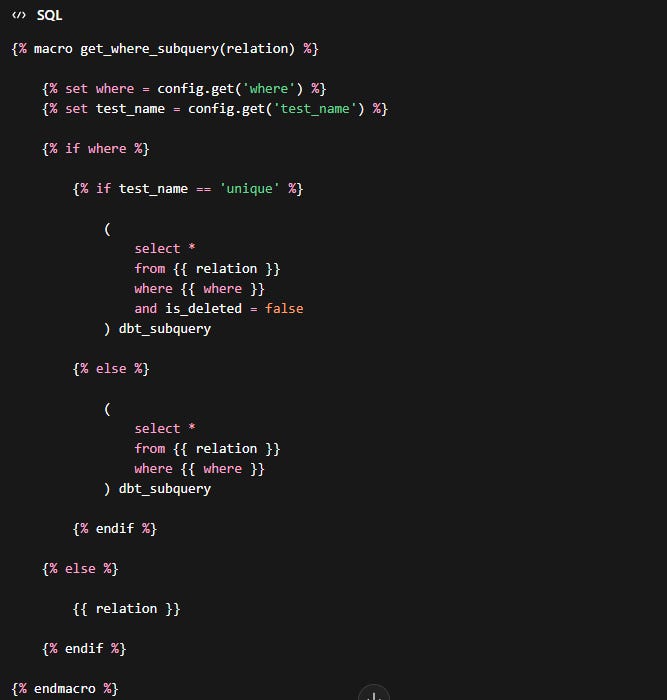
This configuration generates a macro called get_where_subquery that will replace the source reference with a subquery:

For this config, you have access to {{ var( ) }} and {{ env_var( ) }} but not custom macros. This is because configs are evaluated before custom macros are compiled.
To use custom macros in the where: config, you can override the default get_where_subquery.
For instance, say you want to test only the latest partition:
Create the custom macro latest_partition.sql that identifies records of the latest partition:
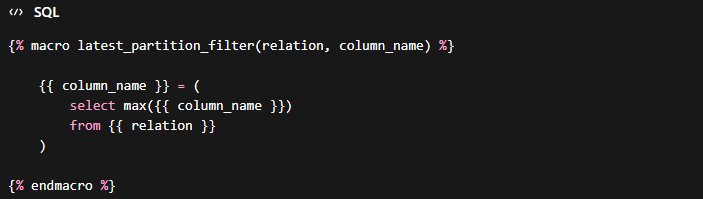
Now, create a macro named get_where_subquery to override the default macro and call the custom macro you just created. Don’t forget to specify the test name this should refer to if you don’t want the get_where_subquery to be modified for all tests.
General configurations
enabled: if set to False, dbt does not consider this resource part of the project.
tags: add common tags to resources to apply commands to all in one go using the “tag:” method.
meta: adds custom metadata for the resource to the manifest.json file and documentation.
database, schema, alias: relevant for store_failures only to set a custom path for failed records.