
Adding data tests to your DAG
Why you should test your data and how to implement data testing in a healthy way to your DAG
Part of the “Mastering dbt” series. Access to the full Study Guide. Let’s connect on LinkedIn!
Notes from the Why is data testing necessary? and Add data tests to your DAG documentation
Data tests are assumptions we make about resources in our project. For instance, we can configure a model to fail or issue a warning when certain preset requirements are not met.
dbt offers a few out-of-the-box solutions, but it is also possible to create custom tests to reflect specific business logic.
In this post, we will cover the reasons why you should add tests to your project and suggest a gradual implementation of data testing. Finally, we’ll go into the nitty-gritty of adding data tests to your DAG.
In the next posts, we will cover data test properties, configurations, and the dbt test command.
The importance of data testing
Whether you deal with internal or external stakeholders, trust in the data is fundamental to getting buy-in and support. Therefore, data professionals cannot afford the risk of sharing incorrect data.
When we are engineering a complex project, we could end up running countless models successfully without ever noticing that something is off.
Data testing helps us ensure that certain assumptions are met before models are built successfully - or at least throw a warning for less critical issues.
The built-in data testing tools in dbt enable you to check if:
The SQL code is doing what it’s meant to do
Assumptions about your source data are correct
Anything changed in your source data that is impacting your assumptions
Introducing data tests gradually and sustainably
You don’t need to set up every data test under the sun just because they are available. dbt’s general rule of thumb goes for data testing too: don’t make your project unnecessarily complex.
dbt suggests the gradual introduction of tests following the phases below:
1) Simple test use cases
Initially, you might not be testing your data.
However, if you’re consistently running into data quality issues or you’re preparing to enhance your project’s complexity, it’s time to consider adding tests.
Primary Keys: Unique & not_null tests help you identify values that mess with filters, joins, or aggregate calculations.
Accepted values or relationship tests: for columns with predictable values, this test flags any new values that appear in the source data.
2) Preempting issues
As your project grows, you might want to start preparing for outliers or lack of freshness.
Here you can go beyond dbt’s out-of-the-box tests and into custom testing to spot and treat these corner cases in your data.
You can also consider configuring freshness so dbt alerts you when a source is stale. Source freshness was addressed in Checkpoint 2.
3) Tackle workflow testing
Once you’ve safeguarded your project, it’s time to expand testing into the pull requests with CI/CD jobs. These will be discussed further in this Checkpoint.
dbt also recommends creating a testing culture within the team with data tests consistently being added to new code and processes in place to debug test failures. I’d also add the usage of a good PR template to ensure data quality, another aspect that will be discussed later in this Checkpoint.
4) Avoid over-testing
At this stage, you could potentially find yourself drowning in warnings and errors generated by data tests.
Consider removing those warnings that you are consistently ignoring so your project only flags those that really deserve your attention. A periodic audit for deprecated fields or tests can be a good tactic.
You can also evaluate switching errors to warnings if you find that your project is delayed over failures that are not that severe.
Finally, consider the value for money of your tests: data testing may incur computing and development costs.
Adding tests to your DAG
What are data tests in dbt?
Firstly, it’s important to understand that, like most things in dbt, data tests are SQL queries. Their statement will pull a list of records that fail the test you set up.
There are two types of data tests in dbt:
Singular data tests
Singular tests are a custom SQL query that returns failing rows saved in a .sql file in your test directory. These are useful to test assumptions that involve specific business logic.
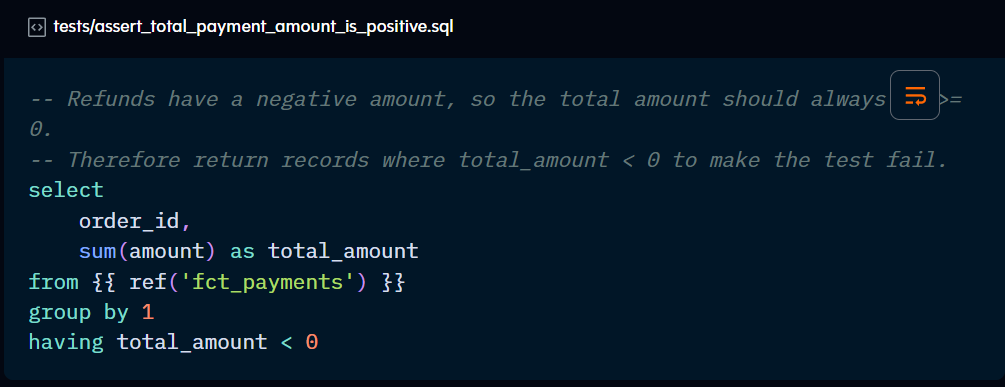
The SQL query should return the list of failing records and their relevant attributes. Remember to omit semicolons at the end of the statement.
You can use Jinja in singular testing, as shown in the ref( ) function above. The name of the file becomes the test name.
Any singular tests included in the test directory will automatically be summoned by the dbt test command.
They don’t need to be referenced or configured in .yml files. However, you may want to document them under the data_test block with a description:
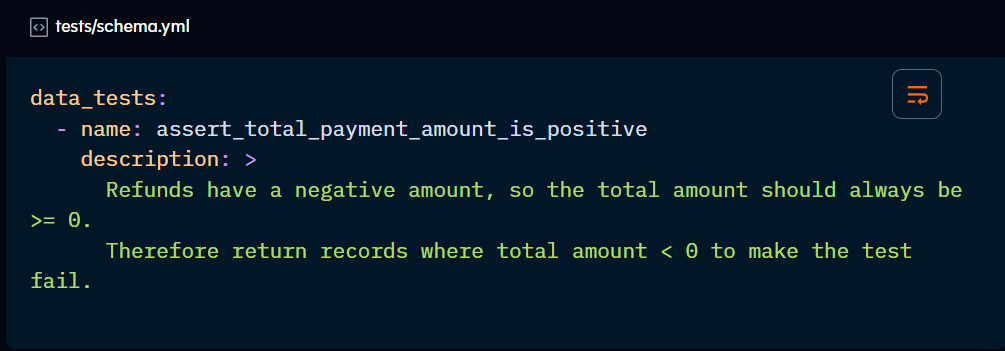
Generic data tests
These are parameterised queries defined by a test block, like a macro, that can be referenced throughout your project. dbt comes with four generic tests out of the box.
Once defined and saved in the tests directory, this test has to be defined as a property of a given resource in their respective yml file.
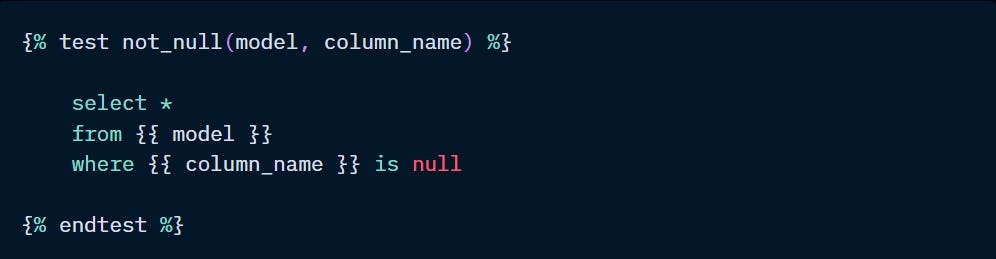
The example above is simply checking a column for nulls. However, dbt already includes this type of testing and three others as a native feature.
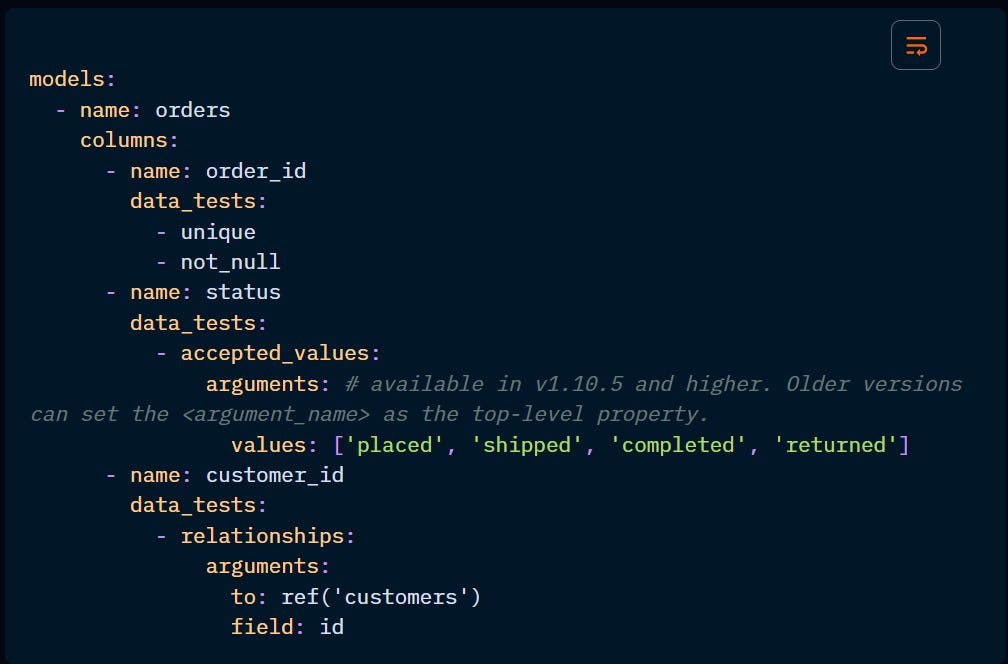
The out-of-the-box generic tests assert that:
unique: a column (or combination of columns) contains no duplicate values.
not_null: a column contains no null values.
accepted_values: all values in a column are in a set of possible values.
relationships: each value in a given column exists in another table.
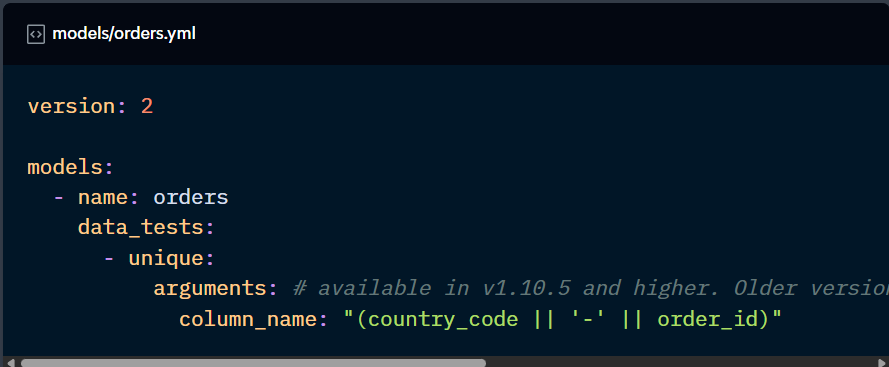
There are additional configurations available for tests, which will be covered later in this Checkpoint.
Besides the native data tests, dbt also offers the ability to write custom generic tests and import them from Packages. The former is not part of the Certified Developer Exam, so it won’t be covered in more detail here. But we’ve explored key open-source packages in the Packages post that include testing macros.